


Last updated: August 2026 | Written by Ashish Kumar, Founder at BusinessBuilts
You filed your ITR weeks ago and moved on with life. Then an email lands in your inbox: “Intimation under Section 143(1).” You open it, spot the word “demand,” and your stomach drops. If you’re now trying to make sense of this income tax demand notice 143 1, you’re not alone, this is exactly the kind of notice BusinessBuilts helps taxpayers decode every single day.
Take a breath. In most cases, this is not a scrutiny notice, and it does not mean you are in trouble with the taxman. It is a routine, computer-generated check that almost every taxpayer sees at least once. The trick is knowing what it actually says, whether the demand is genuine, and what to do about it before the 30-day window closes.
This guide walks through all of that, with a real worked example so you can see exactly how a demand figure is calculated, not just what the jargon means.
Income Tax Demand Notice 143 1 Meaning: What It Is and Why You Got One
Section 143(1) of the Income Tax Act deals with how your return gets processed after you file it. Once your ITR reaches the Centralised Processing Centre (CPC) in Bengaluru, a fully automated system recalculates your income, deductions, and tax liability using the information you submitted, along with data the department already has from your employer, banks, and other deductors.
The income tax demand notice 143 1 meaning, boiled down, is simple: it’s the department telling you, in writing, that its calculation of your tax does not match what you paid. If you’re searching for this in Hindi, you may know it as income tax demand notice 143 1 in hindi, “Section 143(1) ke tehat demand notice”, it’s the exact same document, just referred to differently depending on the language you’re searching in.
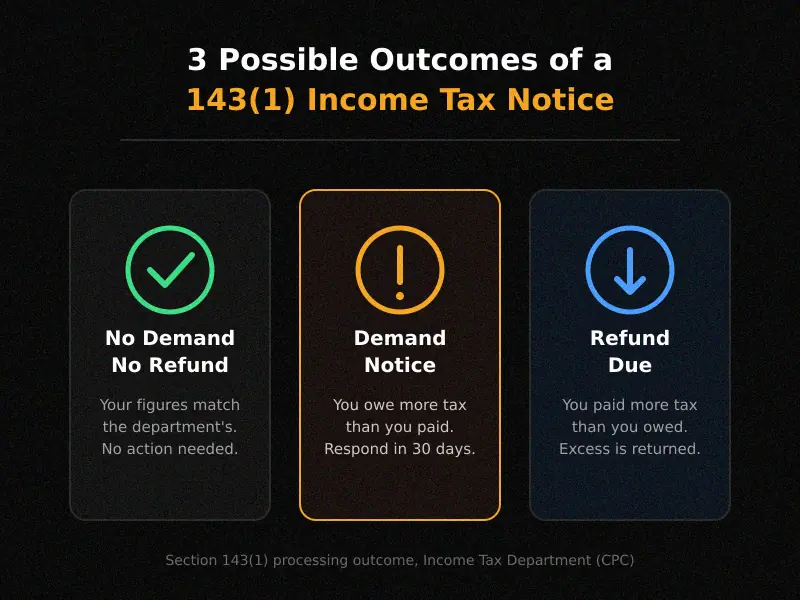
That recalculation produces one of three outcomes:
- No demand, no refund: your numbers match the department’s. Nothing to do.
- Refund: you paid more tax than you owed, and the excess comes back to you.
- Demand: the department’s calculation shows you owe more tax than you paid.
Here is the part most guides skip: if the intimation shows a demand, that intimation itself legally counts as a notice of demand under Section 156. You are not waiting for a separate, scarier letter to show up later. The “income tax demand notice 143(1)” IS the demand notice. That is exactly why so many people search that exact phrase, they are looking at one document that does double duty.
It is also worth saying clearly: this is a summary check, not an investigation. The CPC is not digging into your bank statements or questioning your business. It is comparing numbers on a screen. A separate notice under Section 143(2) is what a genuine scrutiny assessment looks like, and it is a different animal entirely.
Why Did You Receive This Notice? (Common Real Reasons)
Nine times out of ten, an income tax demand notice 143 1 comes down to one of these:
TDS not matching Form 26AS or AIS. Your employer or bank deducted tax, but it has not been reported correctly, or your PAN was entered wrong somewhere in the chain. The CPC only counts TDS credit it can actually see in your Form 26AS, so if there is a gap, you get a demand for that gap.
Income missing from your return that shows up in AIS or TIS. This is the fastest-growing reason for demand notices right now. The Annual Information Statement pulls in interest from savings accounts and fixed deposits, dividend income, mutual fund redemptions, and high-value transactions. If you forgot to report a small FD’s interest or a dividend payout, the mismatch triggers a demand, even if the amount is genuinely small.
A deduction claimed beyond the allowed limit. Say you claimed ₹2,00,000 under Section 80C when the cap is ₹1,50,000. The system flags the excess automatically.
Filing after the due date and still claiming a carried-forward loss. If you missed the original deadline under Section 139(1) and filed late, certain losses cannot legally be carried forward, and CPC will disallow them.
Wrong assessment year on your advance tax or self-assessment tax challan. This one trips up a surprising number of people. You paid the tax correctly, but selected AY 2025-26 instead of AY 2026-27 on the challan, so the payment is sitting in the wrong year’s ledger and does not offset your liability for the year you actually filed.
Simple arithmetic errors. Occasionally it really is just a calculation slip on the return itself.
143(1) Intimation vs 143(1)(a) Notice: Know the Difference
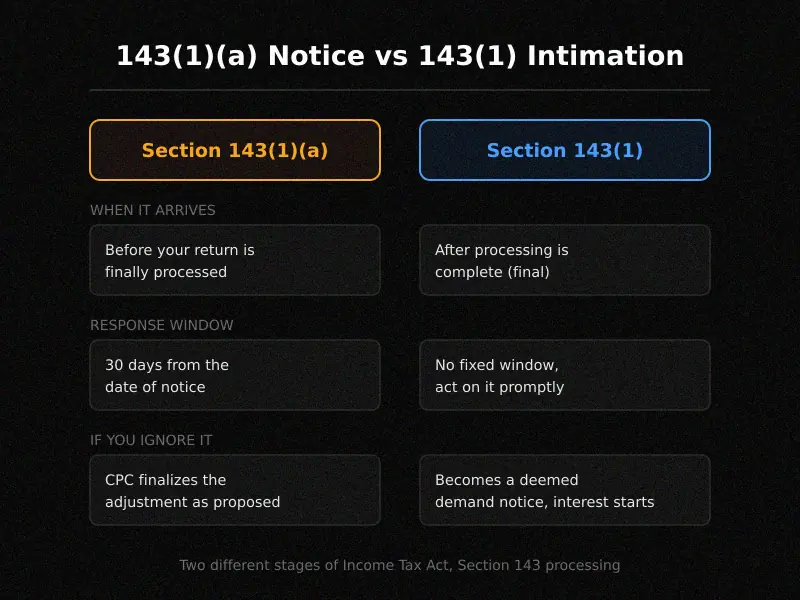
This distinction causes more confusion than anything else on this topic, and it is worth getting straight.
| Section 143(1)(a) Notice | Section 143(1) Intimation | |
| When it arrives | Before your return is finally processed | After processing is complete |
| What it says | “Here is a proposed adjustment, tell us if you agree” | “Here is the final outcome: demand, refund, or no change” |
| Your response window | 30 days from the date of the notice | No fixed reply window for the intimation itself, but rectification and payment should happen promptly |
| What happens if ignored | CPC proceeds with the adjustment as proposed | The intimation becomes a deemed demand notice under Section 156, and interest starts accruing |
If you got a message titled “Communication of Proposed Adjustment under Section 143(1)(a)”, you are still at the negotiation stage. You can log in and respond with “Agree,” “Disagree,” or “Partially Agree” before the final number is locked in. If instead you received an income tax demand notice 143 1 with a demand amount already stated, that decision point has passed and you are now looking at the final figure.
What’s Actually Inside the Notice? A Worked Example
Every 143(1) intimation lays your numbers out in two columns: what you reported, and what the department computed. Here is a simplified, realistic example so the abstract becomes concrete.
Say Priya, a salaried employee, filed her return showing TDS of ₹40,000 deducted by her employer. When CPC checked her Form 26AS, only ₹32,000 in TDS credit was actually reflected against her PAN for that year, because her employer had not filed the TDS return correctly for the fourth quarter.
Her intimation would look something like this:
| Item | As per Priya’s ITR | As computed by CPC |
| Gross total income | ₹9,50,000 | ₹9,50,000 |
| Deductions (Chapter VI-A) | ₹1,50,000 | ₹1,50,000 |
| Tax payable | ₹68,900 | ₹68,900 |
| TDS credit claimed | ₹40,000 | ₹32,000 |
| Net amount payable | ₹0 | ₹8,900 |
The gap is not because Priya did anything wrong. Her employer’s TDS filing did not fully reflect what was actually deducted from her salary. But until that gets corrected on the department’s side, or she pays the ₹8,900, the demand stands.
This is exactly why checking your Form 26AS and AIS before you even file is one of the simplest ways to avoid a demand notice in the first place.
How to Open and Read Your 143(1) Notice
The intimation arrives as a password-protected PDF, usually by email and also available on the e-filing portal.
The password format: your PAN in lowercase, followed by your date of birth in DDMMYYYY format, with no spaces. If your PAN is AAGPR1212A and your birthdate is 2 October 1980, the password is aagpr1212a02101980.
To download it directly from the portal: log in, go to “e-File,” then “Income Tax Returns,” then “View Filed Returns,” and select the relevant assessment year. You will also find it under “Pending Actions” if there is an adjustment involved.
Once it opens, check three things in this order: your PAN and name match, the assessment year matches the return you actually filed, and then the final line, “amount payable” or “refund due.” Everything else is detail you can work through once you know which bucket you are in.
Interest You Might Owe on an Unpaid Demand
If you don’t pay your income tax demand notice 143 1 within 30 days of the intimation, interest under Section 220(2) kicks in at 1% per month (or part of a month) on the outstanding amount, calculated from the date the 30 days end until the date you actually pay.
This is separate from any interest already built into the demand figure itself under Sections 234A, 234B, or 234C, which cover late filing or short payment of advance tax. By the time you see the “net amount payable” figure in your intimation, that interest is usually already included. Section 220(2) is the additional cost of sitting on the demand once it has been raised.
In practice, this means a ₹10,000 demand you ignore for six months does not stay at ₹10,000. It grows every month, and it keeps growing until you either pay it or successfully dispute it.
Step-by-Step: How to Respond to a 143(1) Demand Notice
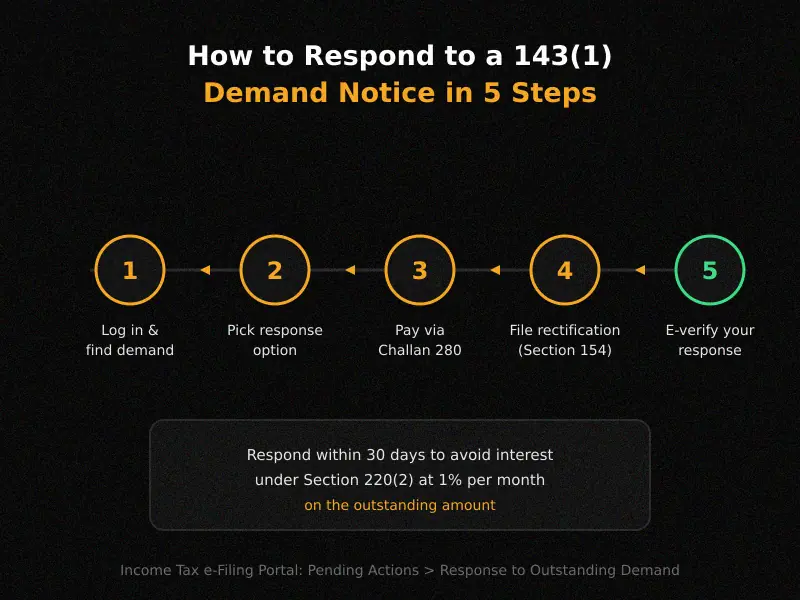
Step 1: Log in and find the demand. Go to the e-filing portal, click “Pending Actions,” then “Response to Outstanding Demand.” You will see the demand listed with a reference number.
Step 2: Pick the right option. The portal gives you exactly three choices:
- “Demand is correct”: use this when you have checked the numbers and agree. You will then pay the amount.
- “Disagree with demand”: use this when you believe the CPC’s figure is wrong, for example if your TDS actually was deducted and you can prove it. You will need to select a specific reason and attach supporting documents like your Form 16 or challan receipts.
- “Demand is partially correct”: use this when part of the adjustment is fair and part is not. You pay the portion you agree with and dispute the rest.
Step 3: If you agree, pay through Challan 280. This is where a lot of people make a small but costly mistake. When you generate the challan, under “Type of Payment,” select (400) Tax on Regular Assessment, not “Advance Tax” or “Self-Assessment Tax.” Selecting the wrong minor head means your payment does not get matched to the demand, and you can end up staring at the same demand notice again a few months later even though you already paid.
Step 4: If you disagree, file a rectification request under Section 154. This is done online through “Rectification” under the Services tab. You are essentially asking CPC to reprocess your return correctly, pointing to the specific mismatch and the evidence that supports your original figures.
Step 5: E-verify whatever response you submit. None of the above is complete until you e-verify it, usually through Aadhaar OTP or net banking. An unverified response does not count.
What Happens If You Ignore the Demand Notice?
Ignoring it does not make it go away. Here is what actually happens:
- Interest under Section 220(2) keeps accumulating at 1% per month.
- The department can adjust the unpaid demand against any future refund you are owed, under Section 245. This is the most common way people “discover” an old ignored demand, their next year’s refund shows up smaller than expected, or does not show up at all.
- In persistent cases, the Assessing Officer can initiate recovery proceedings.
There is one genuinely useful exception worth knowing: as per longstanding CBDT practice, a demand of less than ₹100 is not actively enforced. It stays on record and can still be adjusted against a future refund, but the department will not chase you for a ₹40 or ₹90 demand. That said, if the amount is anything above that, treat it like any other tax liability.
Still Disagree After Rectification? What’s Next
If you filed a rectification request and the outcome still does not sit right with you, you have two more paths.
First, escalate through the CPC grievance mechanism, sometimes called e-Nivaran, available on the portal under the Grievances section. This gets a human at the department looking at your specific case rather than the automated system.
Second, if the disagreement is substantial and the rectification route has not resolved it, you can file a formal appeal before the Commissioner of Income Tax (Appeals) under Section 246A. This is a more formal legal process with its own timelines and documentation requirements.
This is usually the point where it makes sense to stop doing this alone. If you are staring at a notice you do not fully understand, or a rectification that got rejected without a clear reason, a quick review by someone who reads these every day saves far more time than trial and error on the portal.
Not Sure If Your Demand Is Even Correct?
If the mismatch genuinely doesn’t make sense after comparing it against your Form 26AS and AIS, this is a good point to loop in a Chartered Accountant rather than guessing. Filing the wrong response type on the portal (agreeing when you should dispute, or vice versa) can make the situation harder to untangle later, so it’s worth the extra pair of eyes on anything beyond a straightforward TDS mismatch.
Section 143(1) Under the New Income-tax Act, 2025
Here is something that will matter more and more as we move through 2026: the Income-tax Act, 2025 came into force on 1 April 2026, and it renumbers most sections of the old 1961 Act, including this one.
Section 143(1) of the 1961 Act corresponds to Section 270 of the Income-tax Act, 2025. In practice, the framework works on a dual track right now. Returns and pending matters for years before the new Act took effect continue to be governed by Section 143(1) of the 1961 Act. For income earned from FY 2026-27 onward, the new Section 270 mechanism applies instead.
If your notice references “Section 143(1),” it almost certainly relates to an older assessment year and the 1961 Act still applies to it. Do not assume the number has changed on your existing notice, it has not. This distinction mainly matters for how future notices will be worded once returns for FY 2026-27 start getting processed. As always with a transition this large, double-check the specific provision cited on your notice against the assessment year it covers, since the rules that apply depend on which year the return belongs to, not the calendar date you receive the notice.
Frequently Asked Questions
What is an income tax demand notice 143 1?
It’s an automated intimation from the Income Tax Department’s CPC, sent after your ITR is processed, showing that you owe additional tax based on the department’s own calculation. It doubles as a formal notice of demand under Section 156.
Income tax demand notice 143 1 kya hai?
Yeh ek automated intimation hai jo Income Tax Department aapki ITR process karne ke baad bhejta hai. Agar aapne jitna tax pay kiya hai usse zyada tax banta hai, to yeh notice aapko batata hai ki kitna aur tax dena hai. Yahi document legally aapka demand notice bhi maana jata hai.
143(1) ka demand notice hindi mein kaise samjhein?
Notice ke andar do column hote hain, ek aapki ITR ke figures ke, aur doosra CPC ke calculation ke. Jahan bhi in dono mein farq hai, wahi mismatch aapke demand ka reason hai. Password PAN (lowercase) + DOB (DDMMYYYY) hota hai.
What is the time limit for the department to send a 143(1) intimation?
The department can send your income tax demand notice 143 1 up to nine months from the end of the financial year in which you filed the return. For example, if you filed your return for FY 2024-25 in July 2025, the department has until 31 December 2026 to send the intimation. If nothing arrives by then, your return is treated as accepted exactly as filed.
I got a demand notice for ₹40. Do I need to pay it?
No. Demands under ₹100 are not actively enforced, though the amount can still be adjusted against a future refund.
What happens if I miss the 30-day window on a 143(1)(a) notice?
CPC proceeds to finalize the return with the adjustments exactly as proposed, without waiting further for your input.
Can the same intimation show both a refund and a demand?
No. A single 143(1) intimation shows one net outcome, either a demand, a refund, or no change, based on the final calculation.
Is a 143(1) notice the same as a scrutiny notice?
No. Scrutiny is a separate process under Section 143(2), and it involves a much deeper review than the automated check under 143(1).
How do I download my 143(1) intimation again if I lost the original email?
Log in to the e-filing portal, go to “e-File” then “Income Tax Returns” then “View Filed Returns,” select the assessment year, and download it from there.
The mismatch in my notice does not make sense to me. What should I do?
Compare the intimation line by line against your ITR, Form 26AS, and AIS first. If you still cannot pinpoint the source of the mismatch, that is a good sign it is worth a professional review rather than guesswork, since filing the wrong response type on the portal can make the situation harder to fix later.
Related Posts
A income tax demand notice 143 1 is rarely the emergency it feels like at first glance. Most of the time it is a data mismatch, a missed TDS entry, or a challan filed under the wrong year, all fixable once you know exactly where to look. Read the notice line by line, match it against your own records, and respond within the window instead of letting interest build up in the meantime.
Still Unsure What to Do? Ask BusinessBuilts
Drop your specific question in the comments below with the relevant details (not your PAN or personal info, just the mismatch type), and we’ll point you in the right direction. For anything involving a genuine dispute or a demand you don’t understand, a quick consultation with a CA is usually the safer route before your 30-day window closes.
Disclaimer
This article is for general informational purposes only and does not constitute tax, legal, or financial advice. Income tax rules, timelines, and section numbers referenced here (including the transition to the Income-tax Act, 2025) are subject to change through future amendments, circulars, and notifications from the CBDT. Every taxpayer’s situation is different, and the specific facts of your 143(1) notice should be reviewed against your own return, Form 26AS, and AIS before you act. BusinessBuilts recommends consulting a qualified Chartered Accountant or tax professional before making a payment, filing a rectification, or disputing a demand. BusinessBuilts is not liable for decisions made solely on the basis of this article.
About the Author
Written by Ashish Kumar, Founder at BusinessBuilts
Ashish Kumar is a finance and business content writer with over 5 years of experience specializing in personal finance, banking, insurance, taxation, investments, fintech, and business trends. Through BusinessBuilts, he publishes well-researched, accurate, and easy-to-understand content based on credible sources and the latest industry developments to help readers make informed financial decisions.

1 Comment
Pingback: UPI Payment Failed Money Debited: The Ultimate 2026 Fix