



You typed your UPI PIN, the screen spun for a few seconds, and then came the red “Payment Failed” message. A minute later, your bank sends an SMS saying ₹2,500 has been debited. If you are staring at a UPI payment failed money debited situation right now, take a breath: in almost every case, your money has not vanished. It is stuck between your bank, the receiver’s bank and the UPI network, and RBI has set strict deadlines for returning it.
This guide from BusinessBuilts tells you exactly which deadline applies to your case, what to do in the first 10 minutes, how to claim the ₹100 per day compensation if the bank is late, and how to escalate under the RBI Ombudsman rules that changed on 1 July 2026.
UPI Payment Failed, Money Debited: What Actually Happened to Your Money
Every UPI payment passes through at least four systems: your UPI app, your bank (the remitter bank), NPCI’s UPI switch and the receiver’s bank (the beneficiary bank). A UPI transaction failed but amount debited error happens when your bank has already taken the money out, but one of the later steps breaks. The receiver’s bank server may time out, the network may drop, or the confirmation may never reach your app.
At that point, your money sits in a suspense account inside the banking system. It is recorded against your 12-digit UTR number (Unique Transaction Reference), which is why that number matters so much later. The system is designed to send the money back to you through auto reversal, and RBI’s rules decide how quickly that must happen.
Failed, Pending or Wrong Transfer? Identify Your Case First
Before you do anything, open the transaction in your app and check the exact status. The right action depends on which of these five cases you are in:
| Your situation | What the app shows | What it means | What you should do |
| Failed, money debited | Failed | Receiver did not get the money | Wait for auto reversal by T+1, then raise a dispute |
| Pending, money debited | Pending / Processing | Final status not confirmed yet | Do not pay again; wait for the status to update |
| Merchant payment failed | Failed, but order not confirmed | Shop or website did not receive confirmation | Wait for reversal by T+5, keep the order ID |
| Sent to wrong UPI ID | Successful | Money reached the wrong person | Not a failed payment; report to app and bank immediately |
| Fraud or scam | Successful | You were tricked into paying | Call 1930 and file at cybercrime.gov.in right away |
The last two cases are not covered by automatic refund rules, because technically the payment succeeded. This article focuses on the first three, which are covered by RBI’s reversal deadlines.
UPI Refund Time Under RBI Rules (T+1 and T+5)
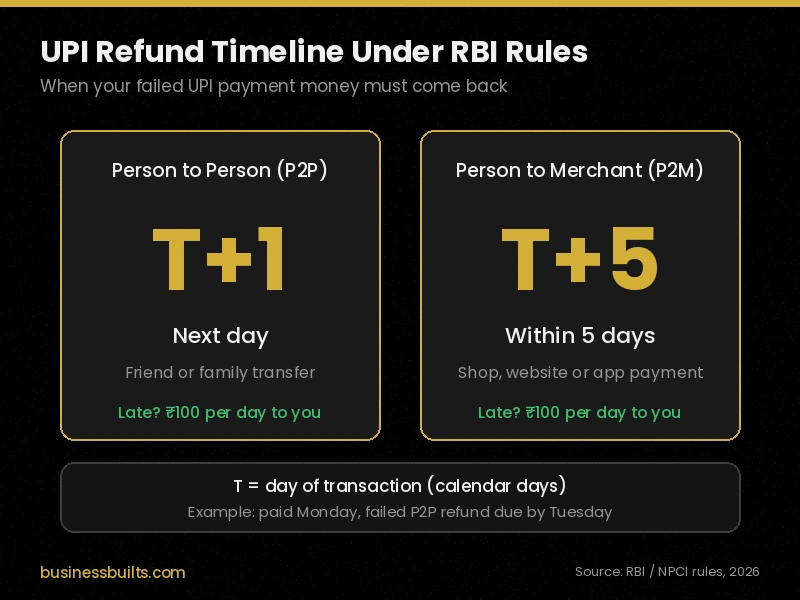
RBI’s circular on Harmonisation of Turn Around Time (TAT) and customer compensation for failed transactions (DPSS.CO.PD No.629/02.01.014/2019-20, dated 20 September 2019) sets the maximum UPI refund time. Here “T” is the day of the transaction, counted in calendar days.
| Type of UPI payment | Deadline for auto reversal | Compensation if late |
| Person-to-person (P2P): money debited, receiver not credited | T+1 (by the next day) | ₹100 per day of delay |
| Person-to-merchant (P2M): money debited, merchant did not get confirmation | T+5 (within 5 days) | ₹100 per day of delay |
Real example: Rahul sends ₹3,000 to his brother on Monday, 7 September. The payment fails, but his account is debited. Under the T+1 rule, the money must be back in Rahul’s account by Tuesday, 8 September.
Merchant example: Priya pays ₹1,499 for a pair of shoes on a shopping website on Monday. Her account is debited, but the site shows “Payment failed” and no order is placed. Her deadline is T+5, so the refund must reach her by Saturday.
In practice, many failed UPI payments reverse within a few minutes to a few hours. T+1 and T+5 are the maximum limits, not the usual waiting time.
What to Do in the First 10 Minutes

These five steps protect your money and make any complaint much stronger later:
- Do not pay again immediately. If the first payment is pending, paying again can lead to a double debit.
- Note the UTR number. Open the transaction in your app and screenshot the 12-digit UTR, date, time and amount.
- Check your actual bank balance. Use your bank app or a missed call service, like the UCO Bank missed call balance check number, to confirm whether money really left your account.
- Tap “Check Status” in the app. This sends a fresh status request through NPCI’s dispute system and can trigger the reversal faster.
- Inform the receiver. If you were paying a person or shop, tell them the payment failed so they don’t assume you paid.
How to Raise a UPI Dispute in Google Pay, PhonePe, Paytm and BHIM
Every UPI app must give you an in-app option to raise a complaint, using NPCI’s UPI dispute system called UDIR (Unified Dispute and Issue Resolution). Button names change slightly between app versions, but the path is similar:
| App | Where to raise the complaint |
| Google Pay | Open the transaction in history, then tap “Having issues?” or “Get help” |
| PhonePe | Go to History, select the transaction, then tap “Help” or “Contact Support” |
| Paytm | Open Balance & History, select the transaction, then tap “Need Help” or “Report an issue” |
| BHIM | Go to Transactions, select the payment, then tap “Raise Concern” |
Raise the complaint once T+1 (or T+5 for merchants) has passed and the money is still not back. Save the complaint reference number you receive, because you will need it if you escalate.
₹100 Per Day Compensation: How It Works

If your bank misses the RBI deadline, it owes you ₹100 per day compensation for every day of delay. Two points make this rule powerful:
- It is suo motu. RBI says the bank must pay it on its own, without waiting for you to complain or claim it.
- It is on top of your refund. You get your original amount back plus the compensation.
Real example: Rahul’s ₹3,000 P2P payment failed on Monday, 7 September. The deadline was Tuesday, 8 September. The money came back only on Friday, 11 September.
| Detail | Value |
| Transaction date (T) | 7 September |
| Reversal deadline (T+1) | 8 September |
| Actual reversal date | 11 September |
| Days of delay | 3 (9, 10 and 11 September) |
| Compensation due | 3 × ₹100 = ₹300 |
Rahul should receive ₹3,000 plus ₹300. If the compensation doesn’t arrive, he should email his bank’s grievance or nodal officer quoting the RBI circular number (template below).
Escalation Ladder: App, Bank, NPCI and RBI Ombudsman

If the refund or compensation still hasn’t come, follow this order. Skipping steps can get your complaint rejected, because the RBI Ombudsman only accepts complaints after you have first approached your bank.
| Step | Where to complain | When to move to the next step |
| 1 | UPI app dispute option | If unresolved after the T+1 or T+5 deadline |
| 2 | Your bank (the one that debited you): customer care, then the Grievance Redressal or Nodal Officer | If no reply or an unsatisfactory reply within 30 days |
| 3 | NPCI UPI dispute redressal: toll-free 1800-120-1740 or the NPCI dispute redressal page | Can be used alongside your bank complaint |
| 4 | RBI Ombudsman UPI complaint at cms.rbi.org.in or helpline 14448 | Final step, free of cost |
What Changed on 1 July 2026: RB-IOS 2026
RBI replaced the 2021 Ombudsman scheme with the Reserve Bank Integrated Ombudsman Scheme, 2026 (RB-IOS 2026), effective 1 July 2026. For UPI users, the key points are:
- It covers banks, eligible NBFCs, non-bank prepaid wallet issuers and payment system participants.
- There is no upper limit on the disputed amount you can bring to the Ombudsman.
- The Ombudsman can award up to ₹30 lakh for consequential loss and up to ₹3 lakh for harassment and mental anguish.
- The process is free, can be tracked online, and includes an appeal mechanism.
- Complaints filed before 1 July 2026 continue under the 2021 scheme.
When filing on RBI CMS, choose the category for UPI or electronic banking, enter your UTR, and upload your bank complaint number and bank statement.
Complaint Email Template (Copy and Use)
Send this to your bank’s grievance or nodal officer. Their email ID is listed on your bank’s website under “Grievance Redressal”.
Subject: Failed UPI transaction not reversed within RBI TAT: UTR [your 12-digit UTR]
Dear Sir/Madam,
On [date], I made a UPI payment of ₹[amount] from my account ending [last 4 digits] to [receiver UPI ID]. The transaction failed, but the amount was debited from my account. UTR: [UTR number]. App complaint reference: [number, if any].
As per RBI circular DPSS.CO.PD No.629/02.01.014/2019-20 dated 20 September 2019 on Harmonisation of Turn Around Time, the amount should have been reversed by T+1, with compensation of ₹100 per day for any delay beyond that.
I request you to reverse ₹[amount] along with the applicable compensation at the earliest.
Regards, [Your name] [Registered mobile number]
Keep a copy of the sent email. If there is no satisfactory reply within 30 days, this email becomes your proof for the RBI complaint.
Refund Scam Warning: Never Enter Your PIN to Receive Money
Fraudsters actively target people searching for UPI money deducted but not received help. They pose as “bank officers” or “customer care” and send you a collect request or a link to “process your refund.”
Remember one rule: you never need your UPI PIN to receive money. A genuine auto reversal lands in your account without any action from you. No bank, NPCI or RBI official will ever ask for your PIN, OTP or card details. Search results and social media also carry fake customer care numbers, so only use numbers from your bank’s official website or app. Learn how to spot such tricks in our guide on fake PhonePe transactions.
If you have already lost money this way, call 1930 and report it at cybercrime.gov.in the same day.
How to Avoid Failed UPI Payments
- Avoid peak hours on busy days. Month-end salary days, the 1st of April and big sale days put heavy load on bank servers.
- Check your daily limits. Banks set their own UPI limits within NPCI’s cap, and a payment above your bank’s limit will fail. New users and people who just reset their PIN may also face a lower cooling period limit.
- Use one stable network. Switching between Wi-Fi and mobile data mid-payment can break the confirmation step.
- Link more than one bank account. If one bank’s server is down, you can pay from another account.
- Keep your app updated. Newer versions include better status checks and security features, especially after the RBI UPI 2FA rules for 2026.
UPI is also changing on the pricing side. If you run a shop or pay large bills, read whether UPI will be charged in India and what it could mean for you.
Frequently Asked Questions
UPI payment fail ho gaya par paisa kat gaya, ab kya karun?
Sabse pehle dobara payment mat karo. App me transaction kholo aur 12 digit UTR number ka screenshot le lo. Agar payment kisi person ko thi, to paisa agle din (T+1) tak apne aap wapas aana chahiye. Tab tak na aaye, to app me “Help” se dispute raise karo aur phir bank ko email karo.
UPI refund kitne din me aata hai?
Kisi dost ya rishtedaar ko bheji payment fail hui ho, to RBI ke rule ke hisaab se refund agle din tak aana zaroori hai. Kisi dukaan ya website ko payment ki thi, to bank ke paas 5 din ka time hai. Zyada tar cases me paisa kuch minute ya ghanton me hi wapas aa jaata hai.
Bank ne time par paisa wapas nahi kiya, to kya mujhe compensation milega?
Haan. Deadline ke baad har din ki deri ke liye bank ko aapko ₹100 dene hote hain, aur ye bank ko khud dena hota hai, aapke maange bina. Agar paisa aa gaya lekin compensation nahi aaya, to bank ke nodal officer ko RBI circular ka number likh kar email karo.
Payment “pending” dikha raha hai aur paisa kat gaya, kya karun?
Pending ka matlab hai ki payment abhi final nahi hui hai, fail nahi. Is dauraan wahi payment dobara bilkul mat karo, warna double paisa kat sakta hai. Kuch ghante wait karo aur app me “Check Status” dabao. Status failed ho jaye to refund ka clock shuru ho jaata hai.
Bank 30 din me complaint solve na kare to kahan jaun?
Tab aap RBI ke Complaint Management System (cms.rbi.org.in) par free me complaint kar sakte ho, ya 14448 par call kar sakte ho. 1 July 2026 se nayi Integrated Ombudsman Scheme 2026 lagu hai. Complaint ke saath apna UTR number, bank complaint ka reference number aur bank statement zaroor upload karo.
Does a failed UPI transaction cost anything?
No. A UPI transaction failed but amount debited case does not carry any charge. You get the full amount back, and if the bank is late, you also get ₹100 per day as compensation.
Can I get compensation if I sent money to the wrong UPI ID?
No. A payment sent to the wrong UPI ID is a successful transaction, so the T+1 reversal and ₹100 per day rules don’t apply. Report it to your app and bank within 24 hours; recovery usually needs the receiver’s cooperation.
Is the refund credited to my UPI app or my bank account?
The auto reversal goes back to the same bank account that was debited. UPI apps don’t hold the money, so check your bank statement or balance, not just the app screen.
Need Help With a Stuck UPI Payment?
Save this page before you need it. When a UPI payment pending money debited or failed payment happens, you’ll have the deadlines, compensation rules and complaint template ready in one place. If your case doesn’t fit any of the situations above, write to us through our Contact Us page and we’ll point you to the right official channel. For more simple guides on UPI, banking, tax and investing, visit the BusinessBuilts homepage.
Sources
- RBI circular DPSS.CO.PD No.629/02.01.014/2019-20, Harmonisation of Turn Around Time (TAT) and customer compensation for failed transactions, 20 September 2019
- Reserve Bank Integrated Ombudsman Scheme, 2026 and RBI FAQs (effective 1 July 2026)
- NPCI UPI Dispute Redressal Mechanism: https://www.npci.org.in/what-we-do/upi/dispute-redressal-mechanism
- RBI Complaint Management System: https://cms.rbi.org.in
Disclaimer
This article is for general information and educational purposes only and is not legal or financial advice. Refund timelines and compensation are based on RBI and NPCI rules available as of September 2026, and individual bank processes may vary. Always confirm details with your bank’s official website or app, and never share your UPI PIN, OTP or card details with anyone. Read our full Disclaimer.
About the Author
Ashish Kumar is the founder of BusinessBuilts and a finance and business content writer with over five years of experience covering personal finance, banking, insurance, taxation and investments. Every BusinessBuilts article is researched from official sources such as RBI, NPCI and SEBI, and updated when the rules change. Read more about BusinessBuilts.
Last updated: 30 September 2026
