


Last updated: August 2026 | Written by Ashish Kumar, Founder at BusinessBuilts
There’s a good chance you’ve already tried one or two numbers for this and gotten either a wrong response, a dead line, or complete silence. UCO Bank’s missed call balance service works fine, but only if you’re using the exact right number for your registered mobile setup, and that’s usually where things go wrong.
That is genuinely frustrating when all you wanted to do was check if your salary landed or if an EMI already got deducted.
At BusinessBuilts, we dug through UCO Bank’s own channels, its customer support responses, and every major result ranking for this query to figure out what is actually true right now. This guide gives you the real picture on the UCO Bank miss call balance check number, what works reliably, and what to do the moment it does not.
Does UCO Bank Actually Offer a Miss Call Balance Check Number?
Here is the honest answer, and it is more nuanced than most pages let on.
UCO Bank does not officially advertise a dedicated “give a missed call and hang up” service the way some private banks do. If you search for it on the bank’s own website, you will not find a page that says “dial this number, let it ring twice, and we will text you your balance.” That specific setup, a number you call and the line disconnects automatically after a couple of rings, is not a service UCO Bank formally lists.
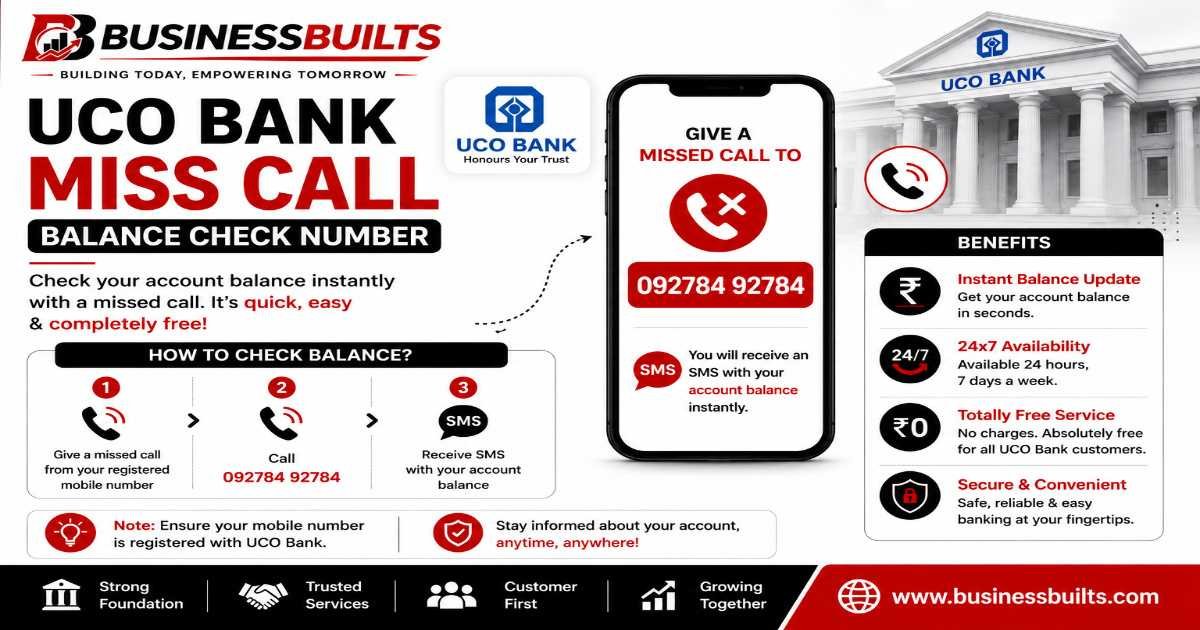
What actually exists is a toll-free number you call and stay on briefly, either through an IVR menu or by speaking to an automated system, to get your balance. UCO Bank’s own social support handle has, in the past, pointed customers toward 09278792787 when asked about balance enquiry, which is likely why so many blogs list it as “the” UCO Bank miss call balance check number. But this is closer to a call-in balance service than a true missed-call-and-disconnect one.
So if you are looking for the UCO Bank miss call balance check number expecting the exact same experience as SBI’s missed call service, set that expectation aside. The safer framing is this: UCO Bank offers a call-based balance enquiry option, and depending on which number you reach, you may need to stay on the line for a few seconds rather than have the call disconnect instantly.
This confusion shows up even among major finance comparison sites. Some list 09278792787 confidently as a missed call number, while others state outright that UCO Bank does not offer any missed call facility for balance enquiry at all, pointing customers only toward the toll-free line instead. Both camps are technically referencing the same underlying service, they just disagree on what to call it. That inconsistency across sources is exactly why we are giving you the practical version here instead of the marketing label.
UCO Bank Miss Call Balance Check Number: Step-by-Step
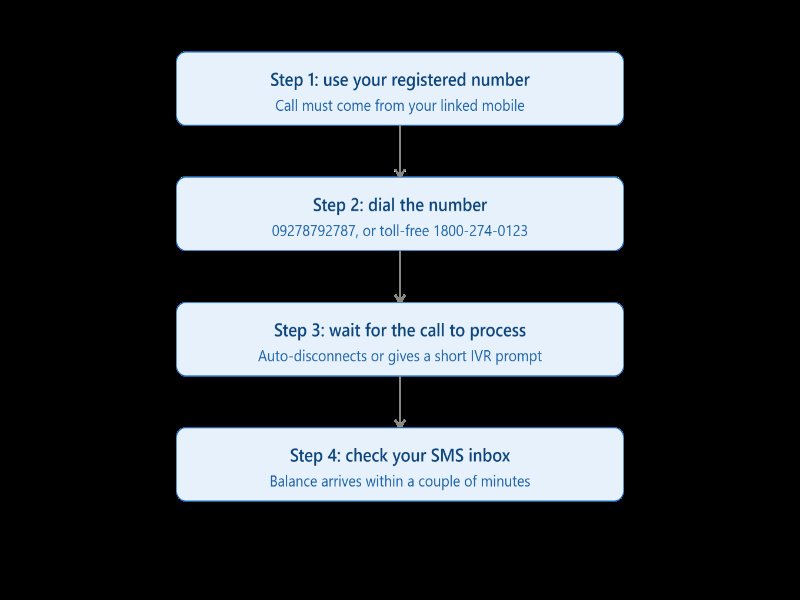
If you want to try the call-based method, here is how to do it properly.
- Use your registered mobile number. This is non-negotiable. If the number calling in is not linked to your UCO Bank account, the system cannot identify you, and the call will simply not return any balance information.
- Dial the number. The most commonly cited UCO Bank miss call balance check number is 09278792787, based on the bank’s own past customer responses. As a backup, the toll-free numbers 1800-274-0123 or 1800-103-0123 are confirmed working channels for balance enquiry.
- Wait for the call to process. Depending on which line you reach, the call may disconnect automatically or route you through a short IVR prompt asking you to confirm the balance enquiry option.
- Check your SMS inbox. Within a minute or two, you should receive a text with your available balance and sometimes the last four digits of your account number for reference.
For example, if Rohit from Kanpur wants to check his balance before making an online purchase, he would dial the number from his registered phone, stay on briefly if prompted, and get his balance by SMS almost immediately, no data connection needed.
How to Register Your Mobile Number for Balance Enquiry
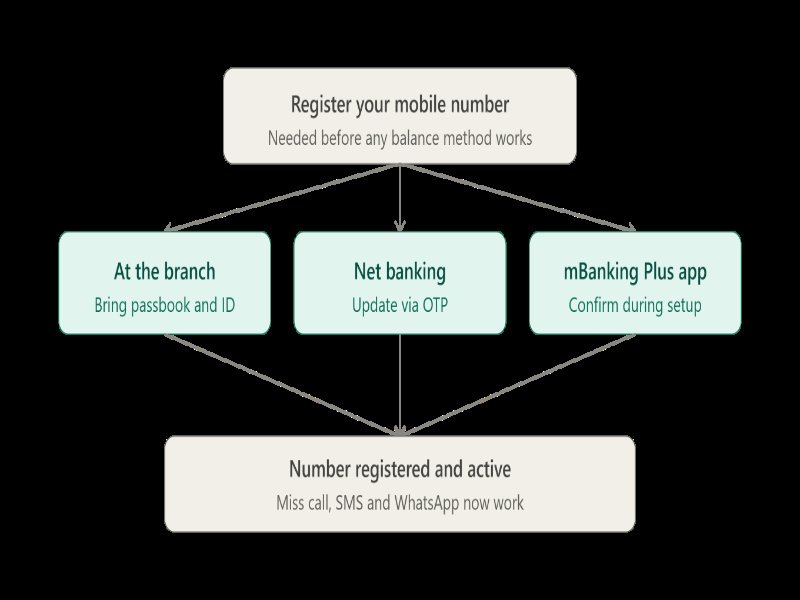
None of this works if your number is not linked to your account, and this is where most people actually get stuck.
At the branch: Visit your home branch with your passbook and a valid ID. Fill out the mobile number registration or update form. This usually takes effect within 24 to 48 hours.
Through net banking: If you already have net banking access, log in and look for “Profile” or “Update Mobile Number” under account settings. You may need to verify through an OTP sent to your existing registered contact or through your debit card details.
Via the UCO mBanking Plus app: During first-time setup, the app usually prompts you to confirm or register your mobile number as part of activation.
Once your number is registered, every method in this guide, including the UCO Bank miss call balance check number, the SMS option, and WhatsApp banking, starts working immediately.
UCO Bank Balance Check via SMS
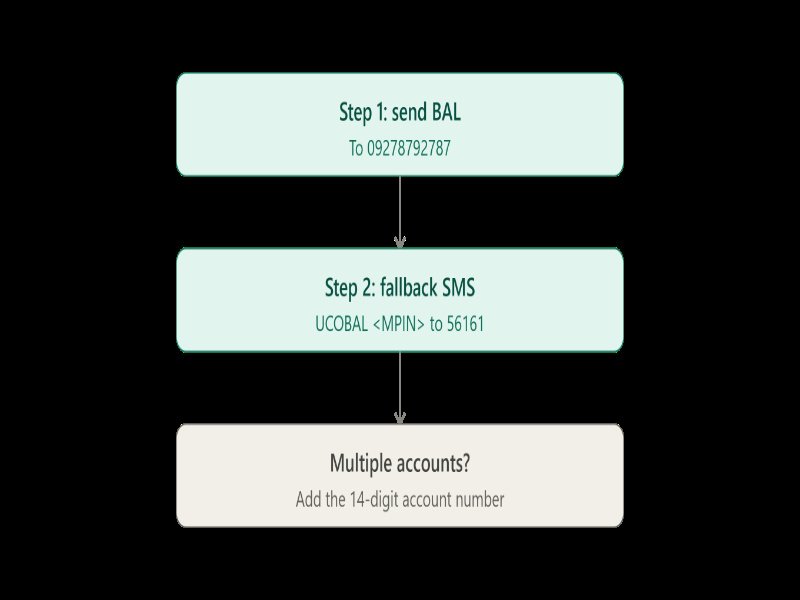
SMS banking is one of the most reliable offline options UCO Bank offers, and it works even on basic phones with no internet.
You have two formats depending on which source you trust, so try them in this order:
- Send BAL to 09278792787
- If that does not return a response within a few minutes, send UCOBAL <your MPIN> to 56161
- If you have multiple UCO Bank accounts linked to the same number, use UCOBAL <MPIN> <14-digit account number> to specify which account you want
Standard SMS charges from your telecom operator apply, but UCO Bank itself does not charge you for this service.
Other Ways to Check UCO Bank Balance (If Miss Call Doesn’t Work)
If the UCO Bank miss call balance check number is not responding for you, and this happens more often than you would think, here are backup methods that are consistently reliable.
| Method | Needs Internet | Needs Registration | Typical Speed |
| WhatsApp Banking | Yes | Yes | Under a minute |
| UCO mBanking Plus app | Yes | Yes | Instant |
| Net Banking | Yes | Yes | Instant |
| ATM | No | No (just your debit card) | Instant |
| UPI apps (PhonePe, GPay, BHIM UCO UPI) | Yes | Account linked to UPI | Instant |
| USSD code | No | Yes | Under a minute |
WhatsApp Banking: Save 8334001234 to your contacts, open WhatsApp, and send “Hi.” You will get a menu where you can select balance enquiry, mini statement, or even apply for a debit card.
UCO mBanking Plus: Download it from the Play Store or App Store, log in with your MPIN, and your balance sits right on the home screen after login.
ATM: Insert your card, enter your PIN, and select Balance Enquiry. This works at any bank’s ATM, not just UCO Bank machines, though UCO Bank ATMs are free of charge for this.
UPI apps: Open any UPI app you use, like PhonePe, Google Pay, or BHIM UCO UPI. Select your UCO Bank account from the linked accounts list. Tap Check Balance. Enter your UPI PIN when prompted. Your balance appears on screen within seconds, no SMS or waiting required.
USSD code: Dial *99# from your registered number even without an internet connection, select your bank, and follow the on-screen prompts to get your balance.
If you are someone like Meena, who runs a small tailoring shop and does not always have data on her phone, the USSD code or a basic SMS is often faster and more dependable than chasing the UCO Bank miss call balance check number when network congestion is high.
UCO Bank Mini Statement via Missed Call
If you need more than just your current balance, like a quick look at your last few transactions, UCO Bank offers a separate missed call number specifically for this. This is different from the balance check number, and it is worth saving separately.
Give a missed call from your registered mobile number to 9213125125. Within a minute or two, you will receive an SMS with your last 5 transactions.
This service, like the balance check option, requires your mobile number to already be registered with UCO Bank. If you have not registered yet, follow the same branch, net banking, or mBanking Plus steps covered earlier in this guide.
For example, if you want to confirm not just that your salary landed, but the exact amount and date it was credited, the mini statement missed call is faster than logging into net banking just to check one line item.
What to Do If the UCO Bank Miss Call Balance Check Number Doesn’t Work
This is the section most guides skip entirely, and it is usually the reason people end up frustrated and searching again.
Your number is not registered. This is the most common cause by far. If you recently changed your SIM, switched to a new number, or opened your account without linking a mobile number, none of the call or SMS methods will recognize you.
Network or carrier issues. Some telecom operators occasionally block toll-free numbers during high traffic periods, especially around salary days or festival seasons when call volumes spike across all banks.
No SMS received. Wait a full five minutes before trying again. If nothing arrives, your number may have been registered incorrectly, or there is a mismatch between the number on file and the one you are calling from.
When to switch to customer care. If you have tried both the call-based method and SMS twice with no result, stop retrying and call customer care directly. It is faster than repeating a broken process three or four more times.
Is the UCO Bank Miss Call Balance Check Number Safe to Use?
Yes, but only if you are using verified numbers, and this matters more than people realize.
Fraudsters have been known to circulate fake “balance check” numbers and SMS shortcodes that mimic real banking services, especially around search terms like this one where confusion already exists. A fake number might ask you to call back, enter your PIN, or share an OTP, none of which a genuine balance enquiry service will ever request.
A few habits keep you safe:
- Only use numbers you have cross-checked against UCO Bank’s official website, app, or verified social media handles
- Never share your OTP, MPIN, or CVV over a call or SMS, even if the number looks official
- Download the mBanking Plus app only from the official Play Store or App Store listing, not from a link sent over WhatsApp or SMS
- If a number claiming to be UCO Bank asks for personal details before giving you a balance, hang up and call the toll-free number directly instead
If you ever suspect fraudulent activity on your account, UCO Bank also offers a dedicated app called UCOSecure, built specifically to instantly block or unblock your digital banking products, including net banking, mobile banking, your debit card, and UPI, all from one place. It is worth downloading this alongside mBanking Plus, since acting fast to block access is often more useful in the moment than trying to remember customer care numbers under pressure.
UCO Bank Toll-Free Customer Care Numbers
Keep these saved somewhere accessible, because they are your fallback for almost everything in this guide.
- 1800-274-0123 – General customer care and balance enquiry, available 24×7
- 1800-103-0123 – Alternate toll-free line for account and card related queries
- 8334001234 – WhatsApp Banking (not a calling number)
Use customer care over the UCO Bank miss call balance check number whenever you need something beyond a simple balance check, like reporting a lost card, disputing a transaction, or unlocking mobile banking.
Frequently Asked Questions
Is the UCO Bank miss call balance check number free to use?
Yes. UCO Bank does not charge you for the call or the SMS reply. Standard telecom charges from your mobile operator may apply depending on your plan.
Does UCO Bank charge for SMS balance enquiry?
No bank-side charge applies, though your telecom provider may deduct a standard SMS fee if you are not on an unlimited SMS plan.
Can I check my UCO Bank balance without a registered mobile number?
Not through the missed call, SMS, or WhatsApp methods. Without registration, your only options are visiting an ATM with your debit card or checking your physical passbook at a branch.
What is the UCO Bank miss call balance check number for NRI accounts?
NRI account holders should use net banking or the mBanking Plus app instead, since the SMS and missed call services are designed for domestic mobile numbers and may not work reliably from an international SIM.
Can I use the UCO Bank miss call balance check number while roaming?
It depends on your telecom operator’s international roaming policy for toll-free and short codes. Many carriers block these numbers while roaming, so net banking or the mobile app is a safer bet if you are traveling abroad.
How do I know if my mobile number is linked to my UCO Bank account?
Try the SMS method first. If you get an instant reply with your balance, your number is registered. If nothing comes through after several minutes, visit your branch to confirm and update it.
Related Bank Balance Check Guides
If UCO Bank is not your only account, or you help family members manage more than one bank, these BusinessBuilts guides cover balance enquiry for other banks people commonly search alongside this topic:
Uttar Bihar Gramin Bank account number digits: if you are trying to figure out how many digits your account number should have before registering it for SMS or missed call banking, this is worth checking, since a mismatched digit count is a common reason balance enquiry services fail to recognize you.
District Cooperative Bank balance enquiry number: cooperative banks often run on a different balance enquiry setup than nationalized banks like UCO, usually requiring a branch visit or a regional toll-free line rather than SMS banking.
Allahabad Bank balance check: since Allahabad Bank merged into Indian Bank, its balance check process now follows Indian Bank’s systems, which trips up a lot of long-time Allahabad Bank customers who are still searching under the old name.
About the Author
Ashish Kumar is a digital marketer and the founder of BusinessBuilts, based in Binauli, Baghpat, Uttar Pradesh. What started as a personal effort to make sense of confusing finance and banking topics turned into BusinessBuilts, a site built to give readers straightforward, jargon-free answers on business, personal finance, banking, insurance, taxes, and investing. Every article is written and fact-checked with one goal: to actually answer the question you searched for.

1 Comment
Pingback: UPI Payment Failed Money Debited: Refund Time & ₹100 Rule