


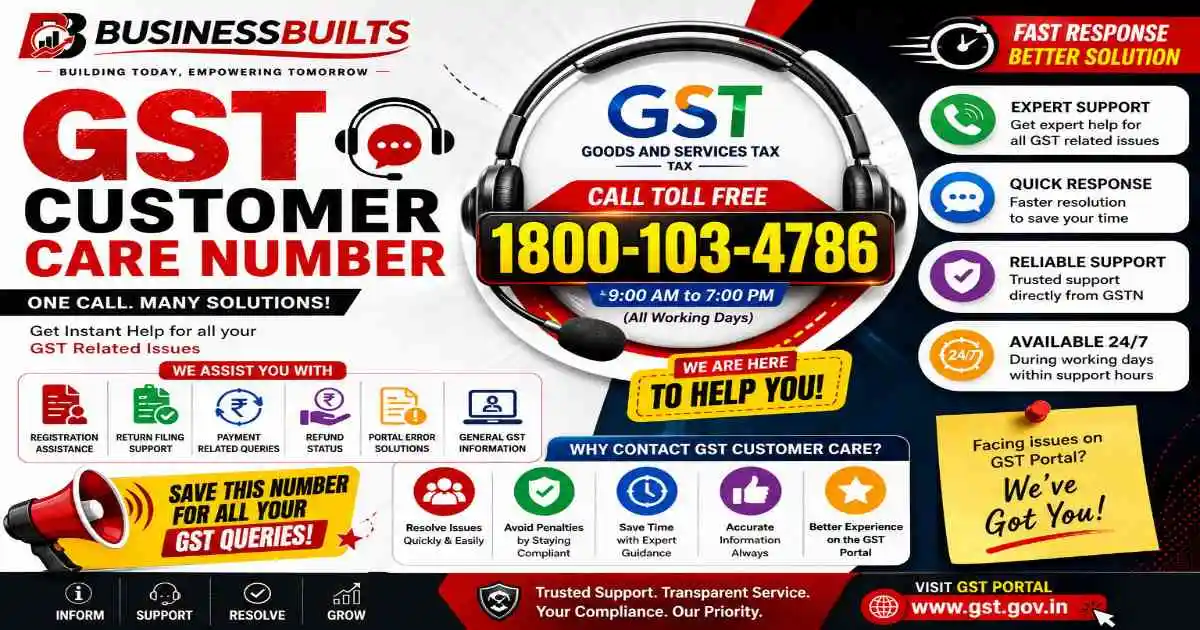
GST customer care number: 1800-103-4786 (toll-free, GSTN Helpdesk). Email: helpdesk@gst.gov.in. Self-service portal: selfservice.gstsystem.in. This number handles GST registration, return filing, GSTIN issues, payments, and portal errors. For Central Excise or Service Tax matters, contact CBEC Mitra at 1800-425-0232. For import/export or ICEGATE portal issues, contact 1800-3010-1000.
If you have ever tried to fix a GST issue by calling the first number that showed up on Google, you already know the problem. You wait on hold, explain your issue, and get told “this is not the right department, please contact so-and-so helpdesk instead.” Then you start the whole process again. BusinessBuilts put together this guide so you don’t have to go through that trial and error.
This support network in India is not one single call center. It is a network of helpdesks, each one built for a specific kind of problem. GSTN handles the portal itself. CBEC Mitra handles Central Excise and Service Tax matters. ICEGATE handles import-export issues. Saksham Seva handles login credentials. If you call the wrong one, you are not doing anything wrong, you just have not been told which door to knock on.
This guide fixes that. Below, you will find every official GST customer care number and email, plus a simple way to figure out exactly who to contact based on what is actually going wrong with your GST account, return, or registration.
What Is the GST Customer Care Number, and When Should You Actually Use It
When people say “GST customer care number,” they usually mean one thing: a single phone number they can call to fix any GST-related problem. In reality, this support system is split across three main bodies. GSTN (Goods and Services Tax Network) runs the portal and handles registration, return filing, and payment issues. CBIC (Central Board of Indirect Taxes and Customs) runs CBEC Mitra, which deals with Central Excise, Service Tax, and SVLDRS matters. ICEGATE handles anything related to imports, exports, and customs clearance on their portal.
This matters more than it sounds. Say you are a small business owner trying to file your GSTR-3B and the portal throws a validation error. That is a GSTN issue, so calling CBEC Mitra will not help you, even though both numbers technically fall under the same umbrella. Knowing which body owns your problem saves you a phone call, or three.
If you are new to GST, a freelancer registering for the first time, or an accountant managing filings for multiple clients, this distinction is worth remembering. It is the single biggest reason people feel like GST support is confusing when it is really just organized differently than expected.
GST Helpline Numbers and Email IDs (Full List)
Here is the complete list of official GST customer care helpdesks, their contact details, and what each one actually covers.
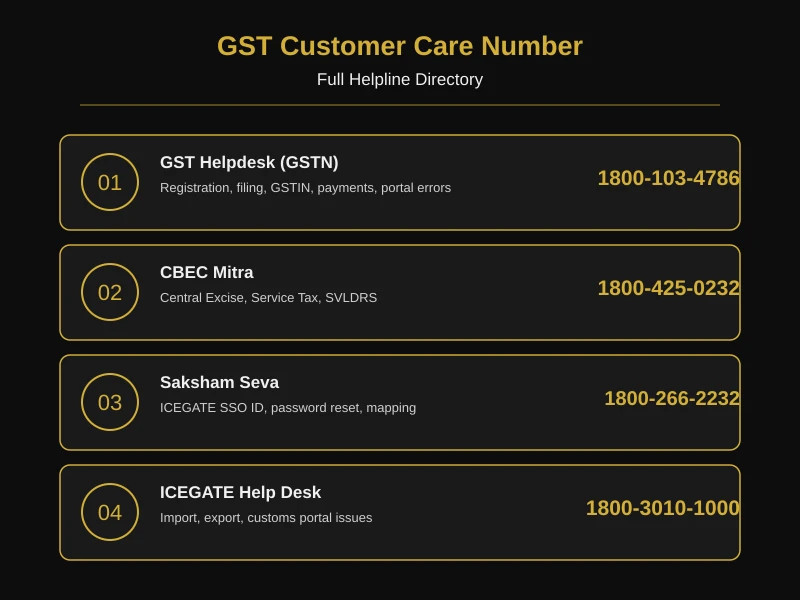
One thing worth knowing: the helpdesk@gst.gov.in email is being gradually phased out. GSTN now pushes most complaints through the self-service portal instead, because it lets you attach documents, get a tracking number, and check your complaint status later, something a plain email cannot do. If you send an email and hear nothing back for a few days, do not wait longer. Move straight to the self-service portal covered below.
Which Number to Call Based on Your Problem
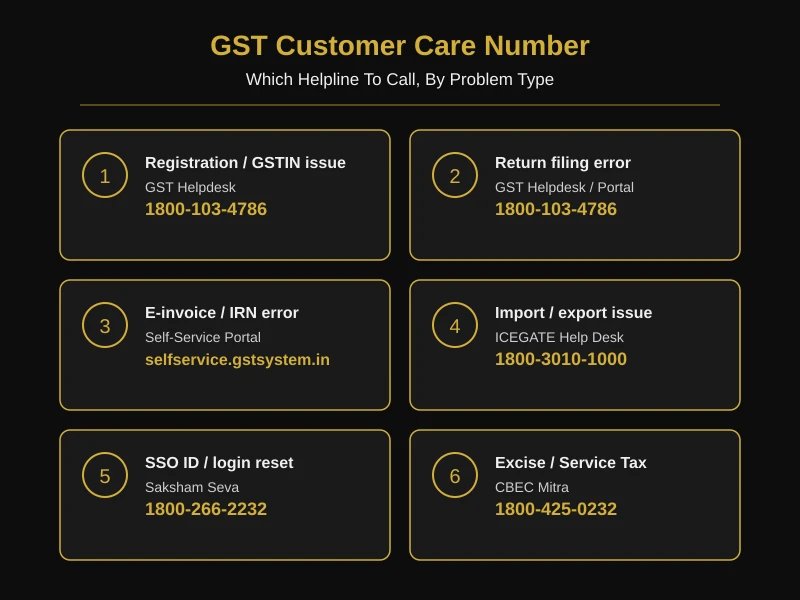
This is the part most guides skip, and it is usually the part people actually need. Instead of listing numbers and leaving you to guess, here is a direct mapping of common GST problems to the right contact.
| Your Problem | Who to Contact |
| New GST registration stuck or rejected | GST Helpdesk (1800-103-4786) |
| GSTR-1, GSTR-3B, or GSTR-9 filing error | GST Helpdesk or self-service portal |
| E-way bill generation problem | GST Helpdesk (1800-103-4786) — use a pin to pin distance check before generating the bill so the transport distance you enter matches what the portal expects |
| E-invoice not generating or IRN error | Self-service portal, with JSON file and error screenshot attached |
| PAN not linking with GSTIN | Self-service portal, with a valid PAN document uploaded |
| SSO ID or ICEGATE login/password reset | Saksham Seva |
| Import/export or customs clearance issue | ICEGATE Help Desk |
| Central Excise or Service Tax matter | CBEC Mitra |
| GST site not working during peak filing days | Usually a load issue on GSTN’s end, not your account — check @askGSTech on X before raising a ticket |
A practical example: say you are an accountant filing GSTR-3B for a client and the portal shows a validation error you have never seen before. Do not just call the general helpline and describe it verbally. Note the exact error message, the return period, and the form type before you call or raise a ticket. GSTN staff can only replicate and fix an error if they know precisely what triggered it, and “it’s just not working” does not give them enough to act on.
How to Raise a Complaint on the GST Self-Service Portal (Step by Step)
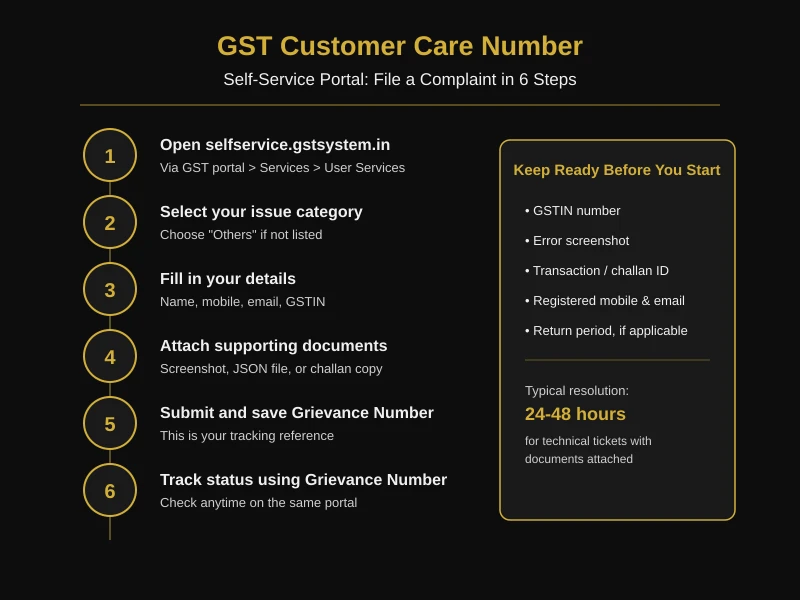
The self-service portal at selfservice.gstsystem.in is genuinely the fastest way to resolve most technical GST issues, faster than waiting on a helpline call. Here is how to use it properly.
Step 1: Go to the portal. You can access it directly, or through the official GST portal under Services > User Services.
Step 2: Pick the right category. The portal lists common issue types. If your problem does not match any listed category, select “Others.”
Step 3: Fill in your details. Name, mobile number, email address, and GSTIN if the issue is account-specific.
Step 4: Attach supporting documents. PDF or JPEG format only. This is the step most people rush through and it is the one that speeds up resolution the most. For an e-invoice error, that means the JSON file and a screenshot of the exact error. For a payment issue, that means the challan copy and transaction ID.
Step 5: Submit and save your Grievance Number. This is your tracking reference, write it down or screenshot it immediately.
Step 6: Track the status. Use the Grievance Number on the same portal to check where your complaint stands.
Before you even open the portal, gather your GSTIN, any error screenshots, and relevant transaction or challan IDs. Having these ready before you start the form cuts the whole process down significantly, because you are not scrambling to find a document halfway through.
How Long Does GST Helpdesk Take to Respond
This is rarely mentioned anywhere, but it matters if you are working against a filing deadline. Technical tickets, like e-invoice generation errors or e-challan mismatches, are often resolved within 24 to 48 hours when the right documents are attached from the start. Registration and return-filing queries can take longer, since they sometimes need manual verification on the department’s end.
If your issue sits unresolved past a reasonable window, do not just keep waiting. The next step is escalating to your State or Zone-wise Nodal Officer, whose contact details are listed on the same grievance portal. If that still does not resolve it, you can lodge a formal grievance through CPGRAMS (Centralised Public Grievance Redress and Monitoring System). This is a genuine escalation path, not a last resort you will never need, and knowing it exists saves a lot of frustration for anyone dealing with a time-sensitive filing issue.
State-Wise GST Helpline and Nodal Officer Contacts
Some GST issues are not portal problems at all, they are state-level matters. Local registration queries, state-specific notices, or department-level clarifications often need a state GST office, not the central helpdesk.
For example, a business registered in Maharashtra dealing with a state GST notice would get faster resolution through the Maharashtra GST department’s helpdesk than through the central GSTN number, since state officers handle state-issued notices directly.
Each state’s GST Bhavan (also spelled GST Bhawan) typically handles walk-in queries for registration and notices specific to that state. The most reliable way to find your state’s exact contact, or your nearest GST Bhavan, is through the official Nodal Officer lookup available on the self-service portal, since these contacts do get updated and a static list can go outdated quickly. If you work with clients across multiple states, as many accountants and CAs do, it is worth bookmarking this lookup tool rather than searching for it fresh each time.
Other Ways to Get GST Help Beyond Phone and Email
Phone and email are not the only options, and depending on your issue, they may not even be the fastest ones.
Twitter/X (@askGSTech): The official GST tech handle is surprisingly responsive for real-time issues, especially during high-traffic periods like the last few days before a filing deadline, when portal slowdowns are common and widely reported.
GST Seva Kendra / GST Bhavan: If your issue genuinely cannot be resolved online, whether that is a document verification problem or something requiring in-person clarification, your nearest jurisdictional GST office, commonly known as the local GST Bhavan or GST Bhawan depending on the state, can help. This is particularly useful for new applicants who are unfamiliar with the online process and would rather sit with someone and sort it out directly.
GST Practitioner Directory: For businesses that need ongoing filing support rather than a one-time fix, the Locate GST Practitioner Tool on the official GST portal lets you find registered practitioners by area or enrolment number. One thing worth knowing here: the government has not fixed any charges for GST Practitioner services, so fees vary practitioner to practitioner. It is worth asking upfront rather than assuming a standard rate.
Frequently Asked Questions
Is the GST customer care number available 24×7?
No. Most GST helplines operate during standard business hours. For issues outside these hours, the self-service portal is available anytime to log a complaint, even if the response comes during working hours the next day.
What is the toll-free GST helpline number?
The main toll-free GST customer care number is 1800-103-4786, run by GSTN for portal, registration, and return filing issues.
Can I file a complaint without a GSTIN?
Yes. If you are a new applicant facing a registration issue, you can still raise a ticket on the self-service portal using your PAN and application reference number instead of a GSTIN.
How do I report GST fraud or a suspicious notice?
Suspicious GST notices or suspected fraud should be reported directly through the GST self-service portal or escalated to your jurisdictional GST office. Note that this is different from an income tax demand notice under 143(1), which comes from the Income Tax Department, not GSTN, and needs to be handled separately.
What documents should I keep ready before contacting GST customer care?
Keep your GSTIN, registered mobile number and email, and anything specific to the error, such as a screenshot, JSON file, challan copy, or transaction ID. Having these ready before you call or raise a ticket speeds up resolution considerably.
What is the difference between GST Helpdesk, CBEC Mitra, and ICEGATE Help Desk?
GST Helpdesk handles portal, registration, and return filing issues. CBEC Mitra handles Central Excise and Service Tax matters. ICEGATE Help Desk handles import, export, and customs portal issues. They are run by different bodies and do not share tickets.
How do I track my GST grievance status?
Use the Grievance Number you received after submitting your complaint on the self-service portal. Enter it on the same portal’s status enquiry page to see where your case stands.
Whom do I contact for e-invoice generation errors?
E-invoice and IRN generation errors should be raised through the self-service portal with the JSON file and a screenshot of the error attached, since this gives GSTN the exact information needed to replicate and fix the issue.
GST customer care number kya hai?
GST customer care ka toll-free number 1800-103-4786 hai. Yeh number registration, return filing, GSTIN aur portal errors ke liye use hota hai.
Mera GST site not working dikha raha hai, kya karu?
Agar GST site not working ho raha hai, especially filing deadline ke aas paas, to yeh usually GSTN server ka load issue hota hai, aapke account ka problem nahi. Thodi der wait karo ya @askGSTech par status check karo.
Mujhe apne area ka GST Bhavan kaise milega?
Aap self-service portal par Nodal Officer lookup use karke apne state ka GST Bhavan ya GST Bhawan address aur contact detail nikal sakte hain.
GST customer care number kaise dhundhe?
Sabse reliable tarika hai official GST portal (gst.gov.in/contact) ya CBIC ki website (cbic-gst.gov.in) check karna, kyunki yahan numbers directly source se aate hain. Third-party websites par diye gaye numbers kabhi-kabhi outdated ho sakte hain, isliye official source hi verify karo.
How to find the official helpline for indirect tax queries?
For indirect tax matters like GST, Customs, and Central Excise, the official helpline can be found on the CBIC website’s Contact Us page, which lists the correct helpdesk, phone number, and email for each type of query. This is the most reliable source since it’s maintained directly by the department, unlike aggregator sites that may not update numbers as they change.
GST customer care number call karne ka tarika kya hai?
Call karne se pehle apna GSTIN, error ka detail, aur relevant documents ready rakho. Number dial karne ke baad IVR instructions follow karo aur apne issue se matching category select karo, isse call directly sahi department ko transfer ho jaati hai aur time bachta hai.
GST notice aur income tax demand notice 143(1) mein kya farak hai?
GST notice GSTN ya state GST department se aata hai, jabki income tax demand notice 143(1) Income Tax Department se aata hai. Dono alag departments handle karte hain, isliye response bhi alag jagah dena padta hai.
Bina GSTIN ke bhi GST helpdesk se help mil sakti hai kya?
Haan, agar aap naye applicant hain aur registration mein issue aa raha hai, to aap PAN aur application reference number use karke self-service portal par ticket raise kar sakte hain, GSTIN zaroori nahi hai.
Related Posts
Whichever helpdesk you end up calling, the fastest resolutions almost always come from being specific: know your error, know your GSTIN, know what step you were on when things broke. That single habit will save you more time than memorizing any number on this page.
Need Help Beyond a Phone Call?
GST helplines can fix portal errors, but they will not tell you whether your return is accurate, whether you’re claiming the right input tax credit, or how to respond to a notice without triggering a bigger one. That is where BusinessBuilts comes in. Our GST and tax consultants handle filing, notice response, and compliance directly, so you are not stuck explaining the same issue to a different helpdesk every time. Get in touch with BusinessBuilts for GST support that goes beyond a call center script.
Disclaimer
All GST customer care numbers, email IDs, and portal links mentioned in this article are sourced from official government channels (GSTN, CBIC, ICEGATE) at the time of publishing. Helpline numbers and contact details are subject to change by the respective departments without notice. BusinessBuilts recommends verifying critical contact details on the official GST portal (gst.gov.in) before relying on them for time-sensitive matters. This article is for informational purposes only and does not constitute professional tax or legal advice.
About the Author
Written by Ashish Kumar, Founder at BusinessBuilts
Ashish Kumar is a finance and business content writer with over 5 years of experience specializing in personal finance, banking, insurance, taxation, investments, fintech, and business trends. Through BusinessBuilts, he publishes well-researched, accurate, and easy-to-understand content based on credible sources and the latest industry developments to help readers make informed financial decisions.
Reviewed by the BusinessBuilts Tax & Compliance Team BusinessBuilts helps small businesses, freelancers, and accountants navigate GST registration, filing, and compliance without the back-and-forth of government helplines. This guide is updated periodically to reflect the latest official contact information.
