


Last updated: August 2026 | Written by Ashish Kumar, Founder at BusinessBuilts
Picture this. It’s evening rush hour at a small kirana store. A customer picks up groceries worth 800 rupees, scans the QR code, turns the phone around and shows a green tick with “Payment Successful” written across it. The shopkeeper is busy with three other customers, nods, and hands over the bag. Ten minutes later, when he finally checks his own PhonePe app, there’s no transaction. No money. Just a screen he was shown for two seconds in a busy moment.
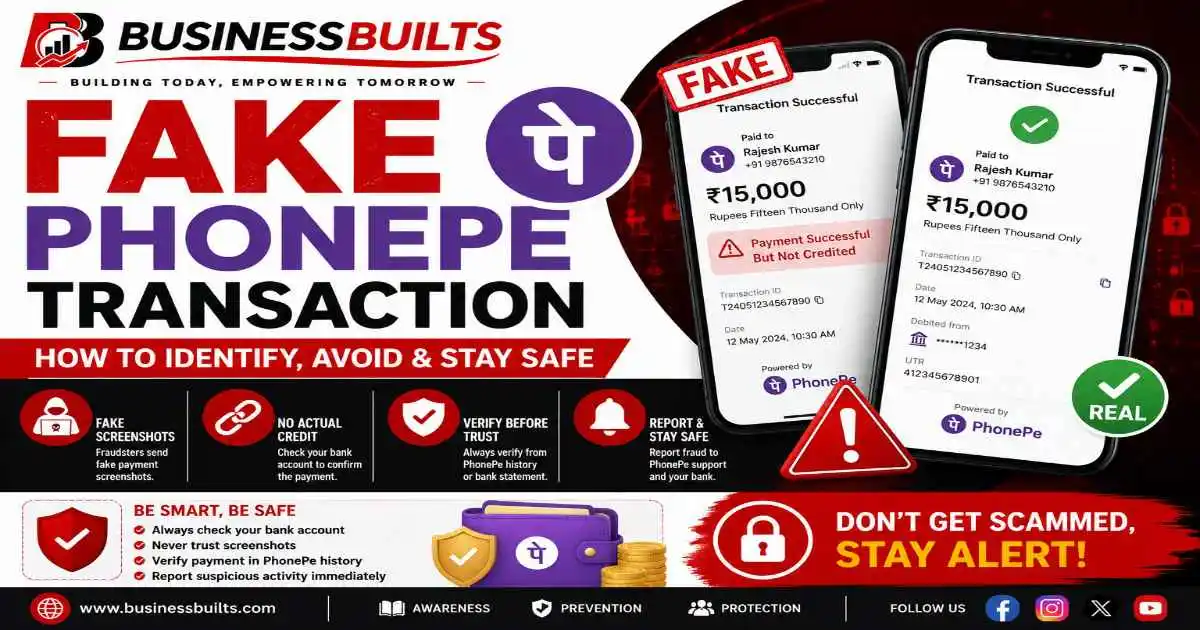
This is a fake phonepe transaction, and it’s happening across Indian shops, freelance deals, and online marketplaces every single day. This exact scenario keeps showing up in different forms, a shopkeeper distracted for two seconds, a freelancer rushed into starting work, a landlord shown a screenshot instead of a bank credit.
What Is a Fake PhonePe Transaction?
A fake phonepe transaction is exactly what it sounds like. Someone makes it look like they’ve paid you through PhonePe, when in reality, no money has moved from their account to yours.
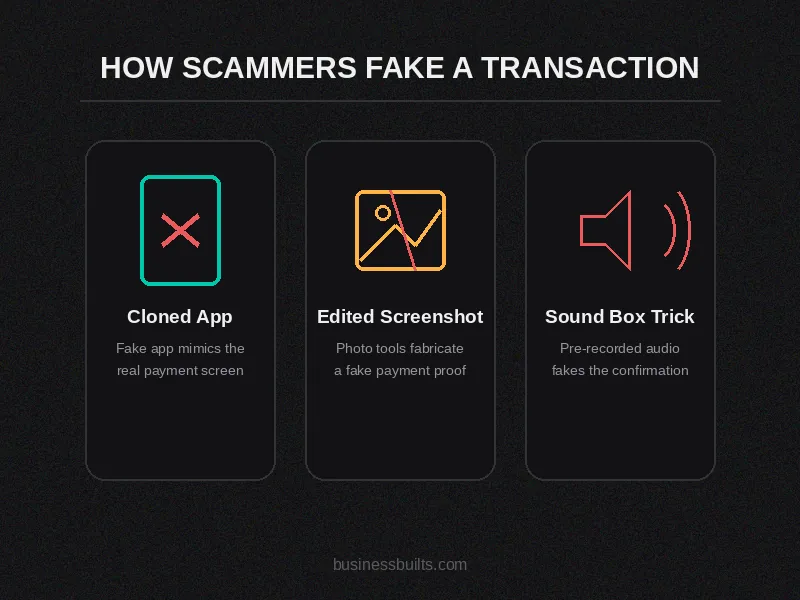
There isn’t one single way scammers pull this off. There are three common methods, and each one targets a different weak point in how we verify payments.
Cloned or modified PhonePe apps. These are fake apps built to look identical to the real PhonePe app. They generate a convincing “payment successful” screen, complete with the green checkmark, amount, and a transaction ID that looks real at a glance.
Edited or forwarded screenshots. No app needed here. The scammer just edits an old screenshot, changes the amount and name using a photo editor, and sends it over WhatsApp or messages as “proof of payment.”
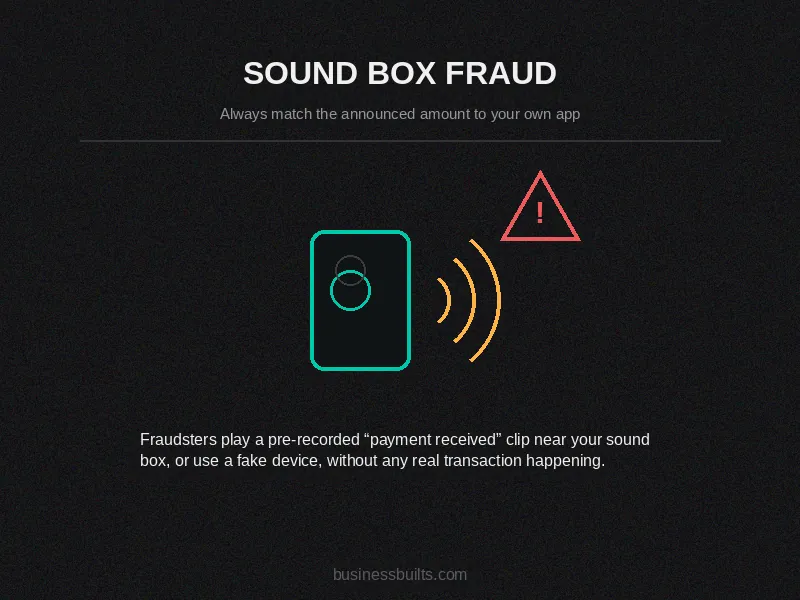
Fake sound box tricks. If your shop uses a PhonePe sound box, scammers can play a pre-recorded “payment received” audio clip near it, or use a fake device that mimics the sound, without any real transaction happening.
This isn’t sophisticated hacking. It’s a trust trick that relies on you being busy, distracted, or simply believing what you see on someone else’s phone screen instead of checking your own.
How the Fake PhonePe Scam Actually Works
The pattern is surprisingly consistent, whether it happens at a shop counter or in a freelance chat.
In-person version. The scammer picks a target, usually a small shop, street vendor, or someone accepting cash-free payments at a busy counter. They scan the merchant’s QR code and show a fake payment confirmation screen almost immediately. If there’s a sound box, they might speak loudly nearby or play a recorded beep to simulate the confirmation sound. The shopkeeper, seeing and hearing what looks like a successful payment, hands over the goods. The whole thing takes less than a minute, and the scammer is already walking away before anyone thinks to double check.
Remote version. This one targets freelancers and online sellers. A “buyer” sends a screenshot claiming they’ve paid the advance, asks you to start the work or ship the product, and often adds pressure like “I’m in a hurry” or “my bank is slow today, but the money will reflect soon.” By the time you realize nothing has actually come through, the product is gone or the work has already been delivered for free.
Both versions rely on the same weakness: acting before verifying.
Real vs Fake PhonePe Payment: How to Tell the Difference
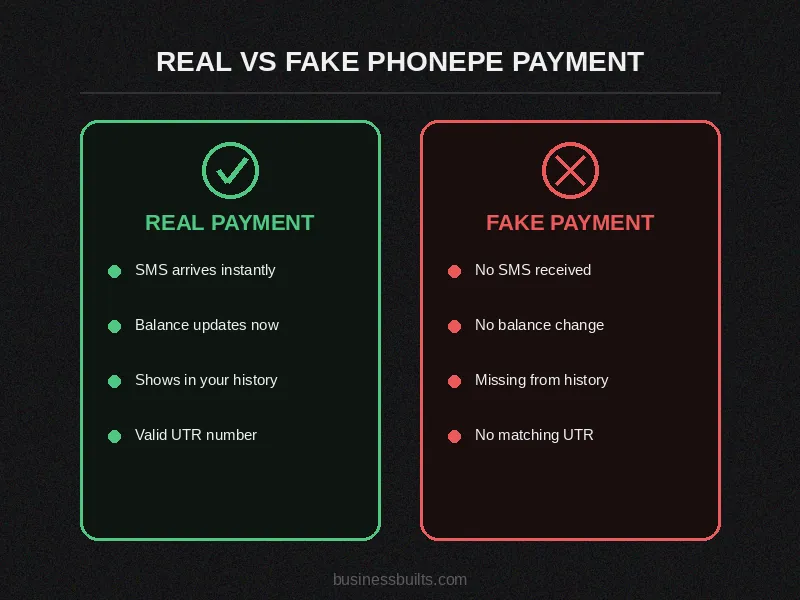
This is the part that actually matters when you’re standing at the counter or replying to a chat message. Here’s a straightforward comparison.
| What you’re checking | Real PhonePe payment | Fake PhonePe payment |
| SMS notification | Arrives on your registered number within seconds | Missing, or arrives never |
| Bank balance | Updates immediately, checkable via UPI app or net banking | No change at all |
| PhonePe transaction history | Shows the payment with a proper transaction ID | Payment does not appear anywhere |
| Transaction ID format | Follows a consistent format | Often missing, incomplete, or doesn’t match your other transaction IDs |
| Customer’s behavior | Comfortable waiting while you verify | Rushed, distracting, or reluctant to let you check your own phone |
If you remember only one thing from this section, remember this. The only source of truth is your own app or your own SMS inbox. Not the payer’s screen. Not their claim that the money will “reflect soon.” Your account, and nothing else.
The 60-Second Verification Protocol
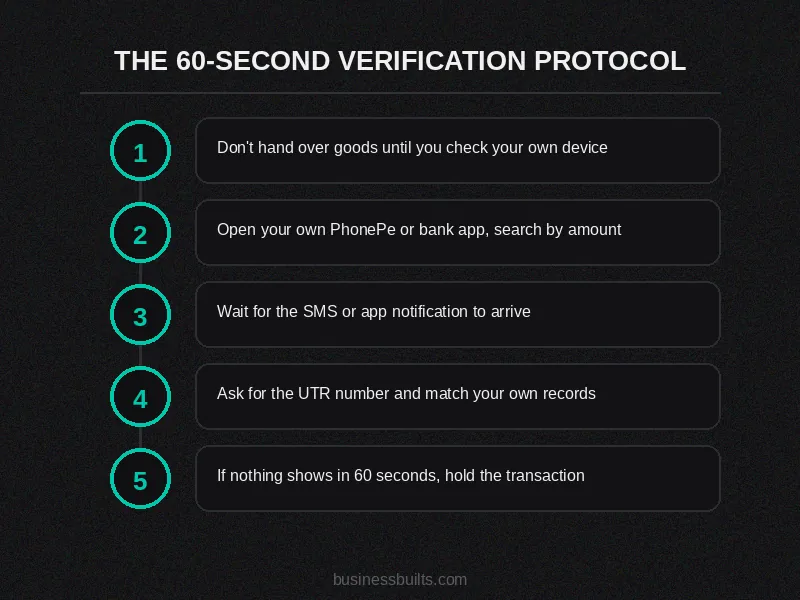
Here’s something most guides skip. Knowing the theory is one thing, but actually doing it at a busy counter with three more customers waiting is another. So here’s a practical, no-friction protocol you can follow every single time, without it feeling awkward.
Step 1. Don’t hand over the product or complete the service until you’ve personally checked your own device. This is the single most important habit to build.
Step 2. Open your own PhonePe app or bank app. Don’t rely on the customer’s screen at all, search your own transaction history by amount.
Step 3. Wait for the SMS or app notification on your registered number. This usually takes just a few seconds for genuine payments.
Step 4. Ask the customer for the UTR (Unique Transaction Reference) number and match it against your own transaction history. A fake transaction will never have a UTR that matches your records.
Step 5. If nothing shows up within 60 seconds, hold the transaction. You can simply say, “Let me just confirm this on my end before we proceed.” Most genuine customers won’t mind waiting a minute. The ones who get impatient or try to rush you are usually the ones you should be most careful with.
This isn’t about being suspicious of every customer. It’s about making verification a normal, quick step, the same way you’d count cash before handing over change.
Fake PhonePe Screenshots: Why They Look So Real
A fake phonepe screenshot doesn’t need a cloned app at all. Scammers use basic photo editing tools, or in some cases dedicated “fake payment generator” websites, to create a screenshot with the exact PhonePe branding, the right shade of green, the checkmark, a believable amount, and a fabricated transaction ID.
You’ll see this most commonly in a few specific situations. Someone selling something on OLX or Facebook Marketplace and asking the buyer to pay first. A landlord collecting advance rent remotely. A freelancer being told “I’ve sent the payment, please start the work.” A product being sold directly over WhatsApp without a payment gateway involved.
The trick works because the screenshot genuinely does look identical to a real one on a quick glance. So here’s what to actually check instead of just glancing:
- Is the top of the screen, including the time and app header, visible or is it conveniently cropped?
- Does the sender’s name and UPI ID match who you’re actually dealing with?
- Is there a UTR number, and does it show up anywhere in your own account?
- Does the font, spacing, or alignment look slightly off compared to a real PhonePe screenshot you’ve received before?
A screenshot, no matter how convincing, is a claim. It becomes proof only when it matches an actual credited entry in your own account.
Fake PhonePe Apps and Sound Box Fraud
This is one of the least talked about parts of this scam, and it’s exactly why we’re covering it in more depth here.
A fake phonepe transaction app is built specifically to fool a quick glance. It copies the layout, the colors, even the little animation PhonePe shows after a successful payment. Someone who’s used to seeing PhonePe screens all day won’t necessarily notice anything wrong in the two or three seconds they’re shown the screen.
Sound box fraud works a bit differently. If you use an official PhonePe sound box at your shop, it only announces a payment when a real, verified transaction actually happens on your merchant account. Scammers exploit this trust by either using a fake sound box device that plays a generic “payment received” audio clip, or simply playing a recorded beep sound near your genuine sound box to make it seem like it triggered. The fix here is simple: always cross check the amount and transaction announced by your sound box against your own PhonePe app, especially during busy hours when it’s easy to just trust the sound and move on.
One more thing worth saying clearly. Downloading or using fake PhonePe apps, or any “fake payment generator” tool circulating on Telegram or unofficial websites, isn’t just risky, it’s illegal, and it can expose your own phone to malware in the process. Avoid these entirely, even out of curiosity. You can read more about PhonePe’s own guidance on fake payment apps on their official trust and safety page.
Who Is Most at Risk

Certain groups face this scam far more often than others, simply because of how their business works.
Kirana and general store owners deal with high transaction volume and fast-paced counters, which leaves little time for verification.
Street vendors and auto drivers often don’t have a proper counter setup, which makes verifying payments in the moment harder.
Freelancers and designers are frequently asked to start work based on “screenshot proof” before any actual advance lands.
Second-hand goods sellers on platforms like OLX or Quikr deal with one-time buyers they’ve never interacted with before, which removes the trust factor that usually catches inconsistencies.
Tuition teachers and small coaching institutes often collect advance fees remotely through screenshots rather than in-person verification.
Small e-commerce sellers operating without a formal payment gateway are especially exposed, since there’s no automated verification layer between the buyer’s claim and the seller’s confirmation.
If you fall into any of these categories, this isn’t a distant risk. It’s something you’re likely to encounter sooner rather than later.
What to Do If You Suspect a Fake PhonePe Transaction
If you catch it before handing anything over, the response is simple. Don’t release the goods or service, check your own app one more time, and if it still doesn’t show up, politely decline to proceed until it does.
If you’ve already been scammed, act quickly, because speed genuinely matters here.
- Note down the customer’s face, phone number, or any identifying detail you can recall.
- Contact your bank or PhonePe support immediately through the in-app Help section or PhonePe’s official webform.
- File a complaint at cybercrime.gov.in or call 1930, the National Cyber Crime Helpline, as soon as possible.
- If the amount is significant, file an FIR at your local police station with all the transaction details you have.
Most banks can freeze the destination account within hours if you report promptly, so the sooner you act, the better your chances of recovery.
How to Protect Your Business Going Forward
A few consistent habits go a long way here.
Make it a rule that no goods or services are released until you’ve personally verified the payment on your own device. Train your staff on exactly what to look for, especially if multiple people handle payments at your shop. Stick to official, verified sound box hardware and never trust an unfamiliar payment app a customer wants to use instead. Ask for the UTR number as a standard practice, not just when something feels off.
The businesses that build this into a habit, rather than treating it as an occasional precaution, are consistently the ones who rarely fall for this scam even once.
Is Faking a PhonePe Transaction a Crime?
Yes, and this is worth knowing even if you never need to use it. People sometimes search how to create fake phonepe transaction out of curiosity or because someone tried to convince them it’s harmless. It isn’t. Showing a fake transaction to obtain goods or services can fall under cheating provisions in Indian law, along with relevant sections of the IT Act, since it involves both deception and misuse of digital payment systems.
This isn’t legal advice, and every case is different, so if you’ve genuinely been a victim, your best next step is filing a complaint through the cybercrime helpline or your local police, who can guide you on the specifics of your situation.
Frequently Asked Questions
How do I know if a PhonePe transaction is fake?
Check your own PhonePe app or bank account directly. If the payment doesn’t appear in your transaction history and you haven’t received an SMS confirmation, treat it as unverified regardless of what the sender’s screen shows.
Can a PhonePe payment screenshot be edited?
Yes. A fake phonepe payment screenshot can be edited using basic photo editing tools or generated using fake payment generator websites, and it can closely replicate PhonePe’s actual design, including the amount, name, and transaction ID.
What is a fake PhonePe payment generator?
It’s an online tool that creates a realistic looking PhonePe payment screenshot with custom amounts and names. Using one to commit fraud is illegal in India.
Will PhonePe refund my money if I’m scammed this way?
If no actual payment was made, there’s nothing for PhonePe to refund since no transaction occurred. However, PhonePe can provide records confirming no payment was received, which is useful when filing a police complaint.
Is a “payment pending” screenshot the same as a fake one?
Not exactly the same, but treat it the same way. A pending or processing status means the money hasn’t reached you yet, so don’t release goods or services until the final credit actually shows in your account.
Can you trace who sent a fake PhonePe transaction?
If no real transaction occurred, there’s nothing to trace within the banking system itself. That said, police can often trace the scammer’s phone number, device details, or location if you report the incident quickly.
What number do I call to report UPI or PhonePe fraud in India?
Call 1930, the National Cyber Crime Helpline, or file a complaint at cybercrime.gov.in. You can also raise the issue directly within the PhonePe app under the Help section.
Mujhe kaise pata chalega ki PhonePe payment fake hai ya real?
Apna PhonePe app ya bank account khud check karein. Agar transaction history mein payment show nahi ho raha aur SMS confirmation bhi nahi aaya, toh use unverified maanein, chahe sender ka screen kuch bhi dikha raha ho.
Kya PhonePe payment screenshot edit ho sakta hai?
Haan, bilkul. Photo editing tools ya fake payment generator websites se fake phonepe payment screenshot banaya ja sakta hai jo bilkul asli jaisa dikhta hai, amount aur transaction ID sab match karke.
Agar mujhe fake PhonePe transaction ka shikaar banaya gaya toh kya karna chahiye?
Turant apne bank ya PhonePe support ko inform karein, aur 1930 helpline pe call karein ya cybercrime.gov.in pe complaint file karein. Jitni jaldi report karenge, paisa recover hone ke chances utne hi zyada honge
Related Posts
Key Takeaways
Fake phonepe transaction scams aren’t complicated hacks. They’re simple tricks that work because they exploit trust and timing, not technical loopholes. A few habits are all it takes to stay protected.
- Always verify on your own device, never on the payer’s screen
- Wait for your own SMS or app confirmation before handing anything over
- Ask for the UTR number and match it against your own account
- Train your staff if more than one person handles payments
- If you’ve been scammed, report it fast through 1930 or cybercrime.gov.in
Small business owners deserve more than just a warning here, they deserve a system they can actually use, even on the busiest day at the counter.
Running a shop or freelance business and want more practical safety guides like this? Explore BusinessBuilts’ complete guide to protecting your business from digital payment fraud and stay a step ahead.
Disclaimer
This article is for general awareness and educational purposes only and does not constitute legal, financial, or professional advice. Scam patterns, app interfaces, and reporting procedures may change over time, so always verify current steps directly through PhonePe’s official channels, your bank, or the National Cyber Crime Helpline (1930). BusinessBuilts does not guarantee recovery of funds in the event of fraud and is not liable for any loss arising from reliance on this content. If you have been a victim of fraud, please consult your bank, the cybercrime helpline, or local law enforcement for guidance specific to your case.
About the Author
Written by Ashish Kumar, Founder at BusinessBuilts
Ashish Kumar is a finance and business content writer with over 5 years of experience specializing in personal finance, banking, insurance, taxation, investments, fintech, and business trends. Through BusinessBuilts, he publishes well-researched, accurate, and easy-to-understand content based on credible sources and the latest industry developments to help readers make informed financial decisions.

3 Comments
Pingback: RBI UPI 2FA Rules 2026: The Ultimate Safety Update
Pingback: Will UPI Be Charged In India? The Ultimate 2026 Answer
Pingback: UPI Payment Failed Money Debited: Refund Time & ₹100 Rule